No more unplanned downtime due to missing spare parts
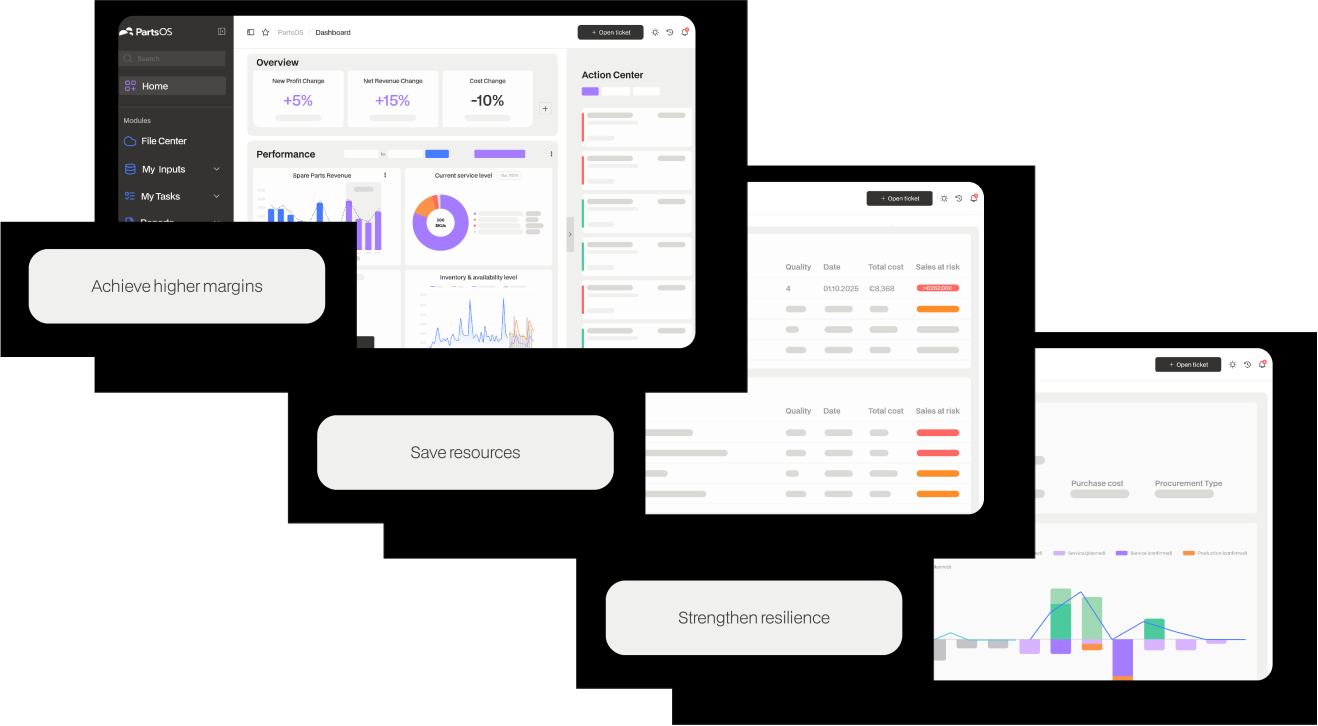
PartsOS Planning gives service teams in mechanical engineering the tools to plan inventory precisely, avoid shortages, and reduce costs.
Live in 3 steps.
-
Upload your data
Transfer ERP data directly. In minutes, without manual setup.
-
Automatic forecasts
PartsOS automatically selects the optimal forecasting model for each spare part.
-

Review and approve recommendations
Review order proposals, approve them, done. PartsOS keeps your inventory continuously up to date.
Your success is our service.
-

Our team will support you beyond the go-live date.
With personalized advice and fast response times. So you can deliver. And so can your customers.
-

Maximize spare parts sales
Whoever can always deliver wins. PartsOS Planning ensures the availability of your spare parts, so you can accept every order, fulfill every contract, and systematically expand your after-sales business.
-
Increase cost efficiency
Excess inventory ties up capital, while shortages cost customers. PartsOS Planning finds the balance with AI-powered forecasts that continuously optimize your inventory and permanently reduce unnecessary storage costs.
What sets us apart
Other services
Implementation
Plug & Play ERP Integration
3rd-Party-Software & -Service Support
Automation & AI
End-to-End Automation & Collaboration
Interactive Dashboards & Analyses
AI & Machine Learning
Live Analyses
Demand forecasting
Order suggestions
User Experience & Flexibility
Intuitive UI
Unlimited Users & Shareholders
Pay-per-Use
Additional Benefits
Tailored Service
Full Usability Without ERP Integration
We’re here for you
Every company is different. What matters to us are your specific challenges. Let’s discuss your future together!

Any questions?
We respond to your inquiries, questions, or comments within 24 hours.

Is PartsCloud the right fit for you?
Let’s find out together! Schedule a no-commitment initial consultation to learn more about our offering and the potential for collaboration.
FAQs Planning
-
What is PartsOS Planning?
PartsOS Planning is an AI-powered spare parts planning software for machine manufacturers. It automates demand forecasting, order recommendations and inventory management and directly integrates into existing ERP systems like SAP or Microsoft Dynamics.
-
Who is PartsOS Planning built for?
For service, after sales and supply chain teams in mid sized machine manufacturing companies that want to move their spare parts planning from spreadsheets to automated, data driven processes.
-
How does PartsOS differ from a standard ERP solution?
ERP systems are built for transactions, not for intelligent planning. PartsOS enhances your ERP with AI-driven demand forecasting and automated order suggestions, without replacing your existing system.
-
How quickly do we see results?
Typically within 10 to 14 days after go live. Often already after the first planning run.
-
How does the onboarding work?
Three easy steps: 1. Upload your data 2. PartsCloud prepares the rest 3. We go through the first planning results together
-
Which resources are needed from the customer side?
One person from the specialist department or scheduling team is sufficient. Optionally, an IT contact for the one-time data export.
-
Are there leadership projects?
No, PartsOS is ready to use immediately. Integration can be done later—optionally.
-
How does PartsCloud support during the onboarding phase?
PartsCloud handles: - Data analysis & mapping - Parameterization - Training in short sessions - Interpretation of results - Guidance through to routine application
Technical und Data Protection FAQs
-
Where is PartsOS hosted?
PartsOS is operated exclusively in Germany (ISO 27001 certified data centers, AWS eu-central-1). All data is encrypted in transit (TLS 1.2+) and at rest (AES-256). No data is transferred to third countries without a separate agreement.
-
How is client separation implemented?
Absolutely no mixing of clients.
-
Which security standards does PartsCloud meet?
- Encryption in transit and at rest. - MFA support. - Backups + recovery strategies. - Physical security via ISO-certified data centers.
-
Is an integration necessary to get started?
No, PartsOS can be used immediately without an ERP integration. Manual exports from the ERP are entirely sufficient. No IT project—virtually no effort required from the IT department.
-
Which integration possibilities are there afterwards?
- SAP IDoc (e.g., MATMAS, MBGMCR, ORDERS). - SAP OData / APIg. - BAPI / RFC. Middleware: PI/PO, Integration Suite, APICON, Boomi. PartsConnect as a lightweight integration layer.
-
Is there a risk of indirect SAP usage?
During onboarding: No, as no data is written back. Subsequently: - Defined technical user - Clearly authorized actions - SAP-compliant architecture → No uncontrolled licensing risk.
-
Which data is needed for the start?
- Material Master - Historical Consumption Data - Inventory Levels - Lead Times / Info Records - Optional: Purchase Orders Simply as a standard export—no reports required.
-
How does data flow back into the ERP system?
- Manual by default (CSV) - Optionally automated via IDoc or API - No automatic order triggering
-
What personal data does PartsCloud process?
Essentially, none; registration takes place exclusively via email addresses.
-
Who is the responsible person?
The customer remains the controller. PartsCloud is a processor pursuant to Art. 28 of the GDPR.
-
How long does PartsCloud save data?
Only for the duration of use. Upon termination: Export + deletion within 30–60 days.
-
Are data transferred to third countries?
No, the hosting is entirely located in Germany.
-
Is personal data used for AI?
No, models operate exclusively on material and motion data.
-
Does AI make decisions?
No, PartsOS provides suggestions, not automatic orders. Ultimately, the decision always rests with a human.
-
Is PartsCloud SAP Build Partner?
Yes, we utilize SAP Best Practices for integration-related scenarios.
-
Does PartsCloud have certified SAP interfaces?
Not yet, but we fully support standardized SAP technologies (IDoc, OData, RFC). Certification is not required for reliable integration.
-
How does PartsCloud handle IDocs?
Direct processing requiring no development effort on the customer's side. Ready-made mappings for common IDocs.
-
Is an Add-on necessary?
No, integration can be implemented without an add-on.
-
Are employees being monitored?
No, PartsOS analyzes exclusively material and process data.
-
Is personal employee data used?
Technical user accounts only. No performance or behavioral monitoring.
-
Are there automated decisions?
No, all decisions remain with the human.
-
How often are backups created?
Daily, multiple restore points.
-
How do I reach support?
Via the integrated ticketing system or your Customer Success Manager.